
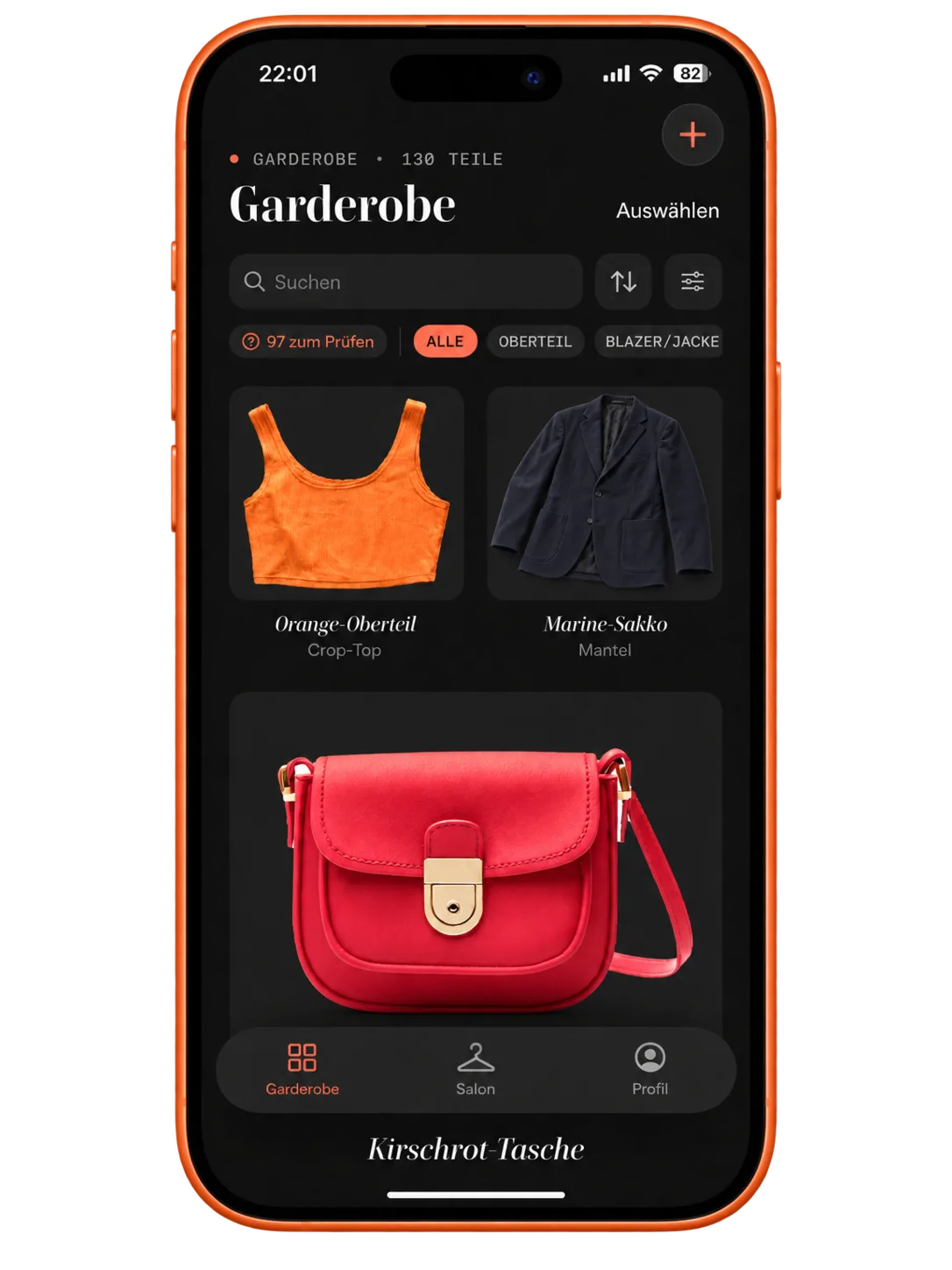
Frag dich einmal, ohne die Türen zu öffnen: Wie viele weiße Oberteile hast du? Die meisten schätzen daneben, und zwar nach unten. Ein digitaler Kleiderschrank beendet dieses Raten. Er zeigt dir auf einem Screen, was du wirklich besitzt. Auch dann, wenn du gerade im Laden vor einem fünften weißen Shirt stehst.
Was ist ein digitaler Kleiderschrank?
Ein digitaler Kleiderschrank ist ein Bildverzeichnis deiner Kleidung. Jedes Teil einmal fotografiert, einer Kategorie zugeordnet, mit ein paar Merkmalen versehen. Das ist alles.
Klingt unspektakulär. Der Unterschied zum echten Schrank ist trotzdem groß: Der echte funktioniert nur an einem Ort und nur mit offenen Türen. Das Verzeichnis hast du dabei. Im Zug, im Laden, morgens um sieben, wenn du noch liegen bleibst und schon überlegst, was du anziehst.
Und es zeigt alles auf einmal. Kein "hinter der ersten Reihe" mehr, keine Winterjacke, die von Oktober bis März aus deinem Kopf verschwindet.
Was du davon hast:
- Du weißt, was da ist, auch von den Teilen, die selten vorne hängen
- Du kombinierst am Bildschirm, statt dich viermal umzuziehen
- Du kaufst gezielter, weil du im Laden kurz nachsehen kannst
- Du planst Reise-Outfits, bevor der Koffer offen auf dem Boden liegt
Für wen sich der Aufwand lohnt
Nicht für jeden. Wer zwölf Teile besitzt und morgens in fünf Sekunden angezogen ist, braucht kein Verzeichnis.
Interessant wird es ab dem Punkt, an dem du den Überblick verlierst, und der kommt früher als gedacht. Sobald der Schrank zwei Reihen tief ist, siehst du die hintere nicht mehr. Sobald du auf mehrere Orte verteilt lagerst, erst recht: Keller, Gästezimmer, der Koffer unterm Bett mit den Sommersachen.
Für alle, die ihre Kleidung zeigen, kommt noch etwas dazu. Wer Outfits fotografiert und postet, plant damit Inhalte im Voraus, statt sie morgens vor dem Spiegel zu improvisieren.
So legst du ihn an
Du brauchst dafür kein Studio und keinen freien Tag. Ein Handy, halbwegs Tageslicht, einen ruhigen Abend.
Der beste Moment ist ein Aufräumtag
Wenn du ohnehin ausmistest, liegt sowieso alles auf dem Bett. Besser wird die Gelegenheit nicht. Wie so ein Durchgang abläuft, steht ausführlich unter Kleiderschrank organisieren – dort ist das Fotografieren Schritt vier von fünf.
Fängst du ohne Aufräumaktion an, nimm dir eine Kategorie vor. Alle Oberteile heute, alle Hosen am Freitag. Wer sich den ganzen Schrank an einem Abend vornimmt, hört bei Teil dreißig auf und macht nie weiter.
Fotos, die später etwas taugen
Vier Dinge, die den Unterschied machen
- Einfarbiger Untergrund: helle Wand, Bettlaken, Innenseite der Schranktür
- Tageslicht von der Seite, kein Blitz. Der macht aus Beige zuverlässig Grau
- Ein Teil pro Foto, flach hingelegt oder aufgehängt, Falten glatt gestrichen
- Immer aus derselben Höhe, dann wirkt die Übersicht später ruhig statt zusammengewürfelt
Perfekt muss das nicht sein. Du baust hier keinen Katalog, sondern ein Gedächtnis.
Den langweiligen Teil übernimmt die App
Zuordnen, benennen, freistellen: genau daran scheitern die meisten Versuche mit Fotoordner und Tabelle. In Try It wird jedes hochgeladene Foto automatisch freigestellt, Kategorie und Farbe erkennt die App selbst. Kein Formular, keine Namen tippen. Am Ende steht dein digitaler Kleiderschrank auf dem Handy, sortiert nach denselben Kategorien wie der echte, nur eben vollständig sichtbar.
Wer erst einmal ohne App anfangen will: Ein Fotoalbum mit Unterordnern tut es für den Einstieg auch. Du merkst nur schnell, dass Suchen und Kombinieren darin mühsam bleiben.
Wie viel du am Anfang erfassen musst
Weniger, als du denkst. Fang mit dem an, was du tatsächlich trägst. Bei den meisten sind das zwanzig bis dreißig Teile, der Rest hängt aus Gewohnheit im Schrank und wird sowieso nie gegriffen.
Damit lässt sich schon kombinieren. Alles Weitere ziehst du nach, wenn du Lust hast, oder eben nie. Ein Verzeichnis, das zu achtzig Prozent stimmt und benutzt wird, ist mehr wert als eines, das vollständig ist und nach zwei Wochen liegen bleibt.
Kategorien und Merkmale, die sich lohnen
Beim Ordnen gilt dasselbe wie im echten Schrank: erst die Art des Kleidungsstücks, dann alles Weitere. Morgens suchst du eine Hose, nicht "irgendwas Dunkles".
Kategorien, die tragen
- Oberteile: Shirts, Blusen, Hemden, Strick
- Unterteile: Hosen, Jeans, Röcke, Shorts
- Kleider und Jumpsuits
- Jacken und Mäntel
- Accessoires: Taschen, Schals, Gürtel, Schmuck
Merkmale, die du wirklich benutzt
- Saison, sonst suchst du im Juli zwischen Wollmänteln
- Anlass: Büro, Alltag, Abend
- Farbe, die Grundlage jeder Kombination
- Marke oder Material, falls dir Pflegehinweise wichtig sind
Mehr braucht es nicht. Wer zwanzig Merkmale pro Teil vergibt, pflegt am Ende ein System statt einen Kleiderschrank. Und hört nach zwei Wochen damit auf.
So bleibt er aktuell
Ein Verzeichnis, das nicht stimmt, ist schlimmer als gar keins. Die Pflege kostet allerdings kaum Zeit, solange sie an Gewohnheiten hängt, die du ohnehin hast.
- Neues Teil sofort fotografieren, am besten noch mit Etikett auf dem Küchentisch.
- Verschenktes und Verkauftes gleich löschen, sonst planst du Outfits mit Sachen, die längst weg sind.
- Merkmale anpassen, wenn ein Teil den Zweck wechselt. Das Bürohemd, das inzwischen am Wochenende läuft.
- Zweimal im Jahr durchsehen, passend zum Saisonwechsel.
Bleibt die Frage, wie viel Disziplin das verlangt. Ehrlich gesagt: erstaunlich wenig. Ein Foto dauert zehn Sekunden, und so oft kaufst du ja nicht ein. Der Punkt, an dem Verzeichnisse kippen, ist fast immer ein anderer. Du räumst im Frühjahr drei Tüten aus, löschst sie aber nicht, und ab da stimmt nichts mehr.
Was du damit machst, wenn er steht
Das Erfassen ist Mittel zum Zweck. Interessant wird es danach.
Kombinieren. In Try It swipst du durch deine eigenen Teile und legst nebeneinander, was du sehen willst: Oberteil, Hose, Schuhe, Jacke. Keine Maschine sagt dir, was du anzuziehen hast. Du siehst deine Sachen zum ersten Mal alle nebeneinander und entscheidest selbst. Was dir gefällt, speicherst du als Look.
Vorher planen. Vier Outfits am Sonntagabend zusammengestellt heißen vier Morgen ohne Entscheidung. Montag ist dann kein Nachdenken mehr, nur noch Anziehen.
Leichter packen. Der Reise-Planer baut die Packliste aus deinem eigenen Bestand: wenige Teile, die zusammenpassen, ein geplanter Look pro Reisetag. Der halbe Schrank bleibt zu Hause.
Nachfragen. Noé, die Assistentin in Try It, kennt deinen Schrank und denkt Anlass und Wetter mit. Sie schlägt Optionen vor und begründet sie. Widersprechen darfst du jederzeit.
Womit übrigens kaum jemand rechnet: Der Schrank fühlt sich danach größer an, obwohl kein Teil dazugekommen ist. Das liegt an der Ansicht. Im echten Schrank hängen die Sachen sortiert nach Bügelplatz, auf dem Screen liegen sie alle auf derselben Fläche, und du verschiebst sie beliebig gegeneinander.
Und wenn du ohnehin in Richtung weniger, aber besser denkst: Der digitale Schrank ist die ehrlichste Vorarbeit für eine Capsule Wardrobe. Du siehst schwarz auf weiß, welche dreißig Teile das bei dir eigentlich sein müssten.
Fang klein an. Zehn Teile, die du oft trägst, heute Abend fotografiert. Der Rest kommt von allein dazu, sobald dir auffällt, wie oft du in die Übersicht schaust.